Kitsmith / Utilities / ChocolateBar

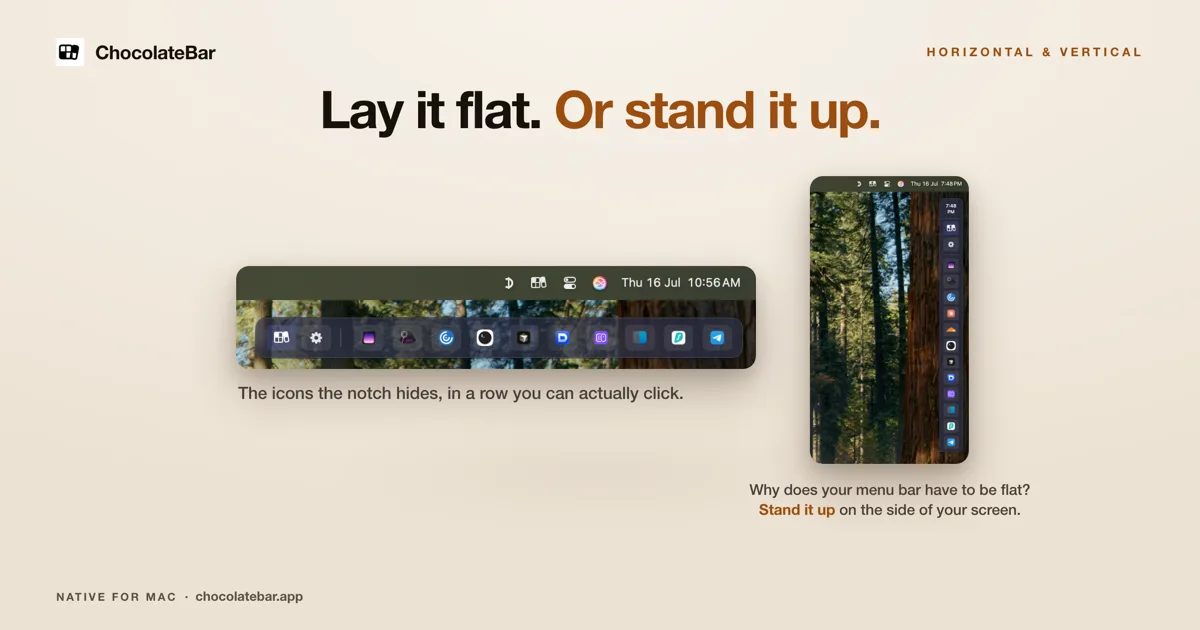
A second row for the icons your notch hides — laid out flat, or stood up vertically on the side of the screen.
Our take
Solves the same crowded-menu-bar problem as Bartender or Ice, but with a distinct trick: a vertical mode that stands the hidden-icon row up the side of the display instead of only offering a horizontal drawer.
- Price
- $10 one-time (launch, regular $15)
- License
- Proprietary
- Requires
- macOS Monterey through Sequoia · Tahoe support planned
- Get it via
- Direct
- Developer
- Aloysius Lim
Do you use ChocolateBar?
Who made this
Solo developer of ChocolateBar, credited in the app’s own site footer as "an independent Mac app by Aloysius Lim." Also writes a blog on the app’s own site.
What it does
Second row of icons
The icons your notch hides get a clickable row under the menu bar instead of disappearing.
Horizontal or vertical
Lay the row flat under the menu bar, or stand it up on the side of the screen.
Shows open app windows
Displays open windows for hidden apps, not just their status icons.
The deal
- $10 one-time with launch code LAUNCH10 (regular $15)
- Covers every Mac you own
- 48-hour free trial, no card needed
- 7-day refund
- Native universal binary, no Electron
ChocolateBar — questions people ask
What does ChocolateBar cost?
$10 one-time with launch code LAUNCH10 at checkout (regular $15); covers every Mac you own.
Is there a trial?
Yes — 48 hours, full features, no card needed, plus a 7-day refund window after purchase.
Does it show open app windows, not just icons?
Yes, per the developer’s FAQ.
Is ChocolateBar free?
ChocolateBar costs $10 one-time (launch, regular $15).
Does ChocolateBar work alongside a notch app like Alcove?
Yes — ChocolateBar lives in the menu bar, so it runs happily alongside any Dynamic Island hub or notch app.
Where can I download ChocolateBar?
ChocolateBar is available via Direct.
Reviews
No public ratings yet. Reader reviews are coming to Kitsmith soon.
Listing hand-verified July 27, 2026 from the developer's site and public sources.
How ChocolateBar compares
Also in menu bar managers

Bartender
One-timeThe long-running standard for organizing, hiding, and styling menu bar items.

Ice
FreeFree, open-source menu bar management — the community’s answer to Bartender.

Hidden Bar
FreeA tiny open-source toggle that tucks menu bar icons out of sight.

Dozer
Free, open sourceA free, open-source menu bar icon hider — drag icons behind a Dozer arrow to tuck them out of sight, with an optional second hidden group.