Kitsmith / Compare / ChocolateBar vs Hidden Bar
MacChocolateBar vs Hidden Bar
ChocolateBar vs Hidden Bar: verdict, pricing, and specs compared, so you can pick the right one for your Mac.
At a glance

ChocolateBar
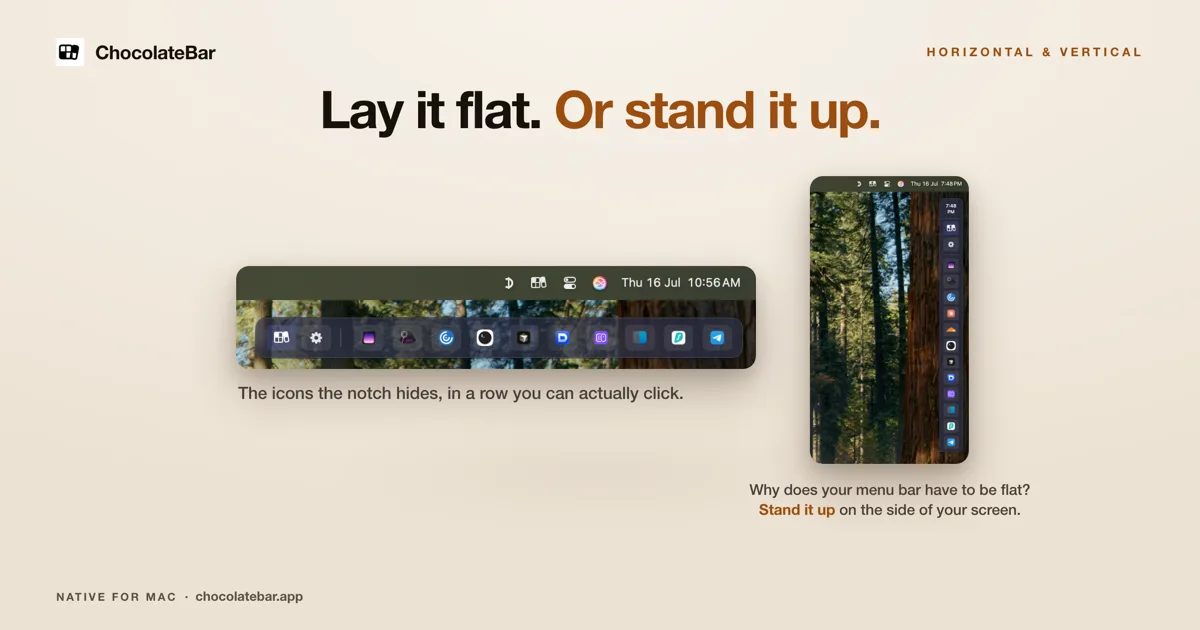
$10 one-time (launch, regular $15)A second row for the icons your notch hides — laid out flat, or stood up vertically on the side of the screen.

Hidden Bar
FreeA tiny open-source toggle that tucks menu bar icons out of sight.
Spec comparison
ChocolateBar
- Price
- $10 one-time (launch, regular $15)
- Pricing model
- Paid
- License
- Proprietary
- Placement
- Menu bar
- Channels
- Direct
- Category
- Utilities
Hidden Bar
- Price
- Free
- Pricing model
- Free
- License
- Open source
- Placement
- Menu bar
- Channels
- GitHub · Mac App Store
- Category
- Menu Bar
The verdict
Hidden Bar is free, open source, and deliberately does the simplest possible version of this job — a tiny toggle that tucks icons out of sight, nothing more. ChocolateBar costs $10 one-time at launch (regular $15) and does more: a second row for hidden icons that can stand vertically up the side of the screen instead of just tucking away. If you want the bare minimum for free, Hidden Bar is hard to beat; if you want that vertical row and more control, ChocolateBar is the paid step up.
Which one should you pick?
Pick ChocolateBar if…
- Pick ChocolateBar if you want a full second row for hidden icons, with a vertical layout option
- Pick ChocolateBar if you’ve outgrown a simple toggle and want more control
- Pick ChocolateBar if $10 one-time (launch price, regular $15) is worth it for the extra layout options
Pick Hidden Bar if…
- Pick Hidden Bar if you want the simplest, free version of the job — a toggle, nothing more
- Pick Hidden Bar if you want free, open-source software you can install from GitHub or the Mac App Store
- Pick Hidden Bar if simplicity itself is the feature you’re after
ChocolateBar vs Hidden Bar — questions people ask
Is Hidden Bar free?
Yes — Hidden Bar is free and open source, available via GitHub and the Mac App Store.
Is ChocolateBar more powerful than Hidden Bar?
ChocolateBar does more — a full second row with a vertical layout option — while Hidden Bar is deliberately the simplest possible version: a toggle that tucks icons out of sight.
Which should I try first?
Hidden Bar, since it’s free and the simplest option — if you need more control, ChocolateBar or Ice add it.