Kitsmith / Utilities / NotchPad
AI notes, folders, clipboard history, and snippets, all opened by hovering the notch.
Our take
Combines three tools people usually run separately — notes, clipboard manager, snippet expander — behind one hover gesture, with Apple Intelligence rewriting on supported Macs and Touch ID locking for sensitive notes.
- Price
- $14.99 one-time
- License
- Proprietary
- Requires
- macOS 15 Sequoia or later
- Get it via
- Direct
- Developer
- Oncel Cebeci
Do you use NotchPad?
Who made this
Bangkok
Founder of Tiny Things, an independent studio for AI-native and native software, based in Bangkok — per his own portfolio site, which also lists NotchPad alongside several other shipped apps.
What it does
Hover to open
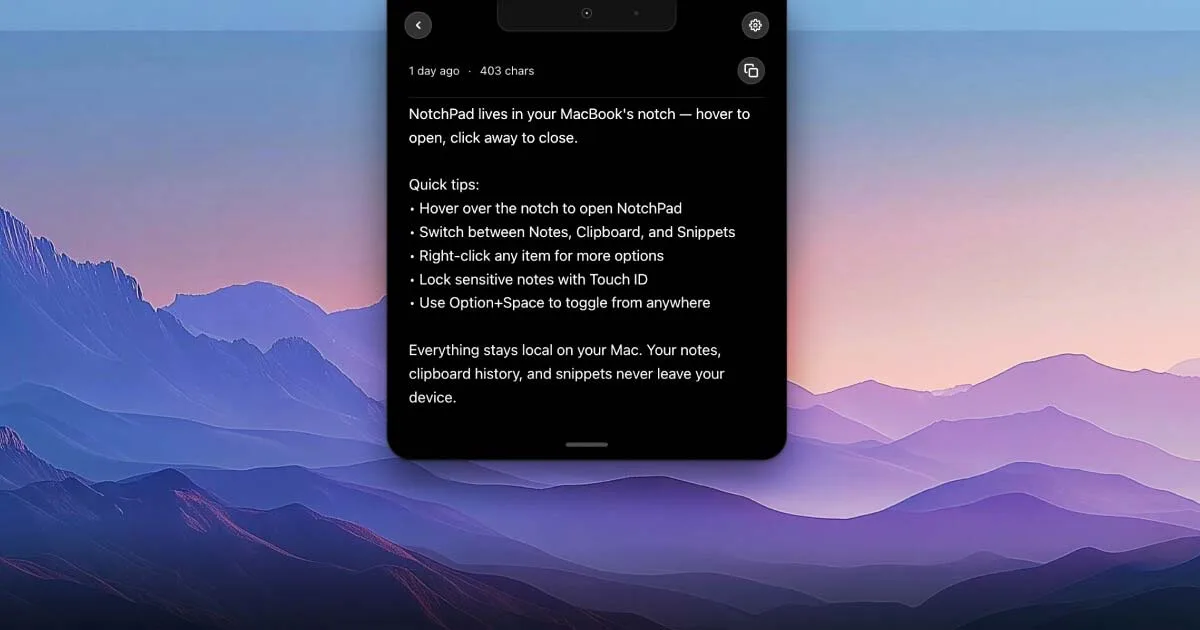
Hover the notch to open NotchPad; click away to close, or toggle from anywhere with Option+Space.
AI note rewriting
Rewrite notes with Apple Intelligence on supported Macs.
Clipboard history search
Search past copies without leaving the notch panel.
Snippets
Paste reusable text snippets, with a 5-snippet cap on the free tier.
Touch ID lock
Lock sensitive notes behind Touch ID.
Apple Notes bridge
Open Apple Notes directly from the same panel.
The deal
- $14.99 one-time purchase
- No subscription
- Free tier caps at 5 snippets and daily AI edits on supported Macs
Privacy: Notes, clipboard history, and snippets stay local to the Mac, per the developer.
NotchPad — questions people ask
Is NotchPad a subscription?
No — $14.99 one-time purchase, no subscription.
What’s included in the free tier?
Notes, up to 5 snippets, and daily AI edits on supported Macs; Pro removes those limits.
Does NotchPad send my notes anywhere?
No — the developer states notes, clipboard history, and snippets never leave the device.
Is NotchPad free?
NotchPad costs $14.99 one-time.
Can I run NotchPad together with another notch app?
No — NotchPad draws at the notch, so it takes the place of any other notch app (hubs included). Apps that live in the menu bar or on screen stack alongside it fine.
Where can I download NotchPad?
NotchPad is available via Direct.
Reviews
No public ratings yet. Reader reviews are coming to Kitsmith soon.
Listing hand-verified July 27, 2026 from the developer's site and public sources.
Not sold on NotchPad? These swap in
Notch apps run one at a time — pick one of these instead, not as well.
Stickies - Sticky notes app
Free; Stickies Pro $2.99 one-time unlockA markdown-formatted sticky notes app for macOS — free with a $2.99 Pro unlock, from the maker of the JSitor code playground.
Quick Note: Sticky Notes Menu
Free; Quick Note Pro $12.99 one-time unlock (unlimited notes, automation)Menu bar notes that float above every window — one click or a shortcut to jot something down, free with a $12.99 lifetime Pro unlock.

Simplenote
FreeFree, cross-platform note-taking app from Automattic — real-time sync, tags, note history, and Markdown, with nothing paid.

Sticky Notepad: Notes & Memo
FreeFree, colorful sticky notes for the Mac desktop and menu bar, with rich text formatting and adjustable transparency.
Keep NotchPad — stack these next to it
These live in the menu bar or on screen, so they run happily alongside any notch app.