Kitsmith / Utilities / QuackScreen
A native notch screen recorder and screenshot tool — record, drag the clip out, drop it into Slack or Finder.
Our take
The drag-and-drop-out workflow is the differentiator: a clip lands in the notch and you drag it straight into another app instead of hunting for it in a save dialog or Downloads folder. Free to use; a license removes the watermark and length cap.
- Price
- Free / €20 one-time lifetime license
- License
- Proprietary
- Requires
- macOS 26 (Tahoe) or later · Apple silicon
- Get it via
- Direct
- Developer
- NFxAI
Do you use QuackScreen?
Who made this
NFxAI ✓
NFxAI is a studio, not an individual — its GitHub org describes itself as "NFxAI Ventures, shaping next frontier of AI," and also publishes Highlight Studio, a screen-recording tool.
What it does
Drag files out of the notch
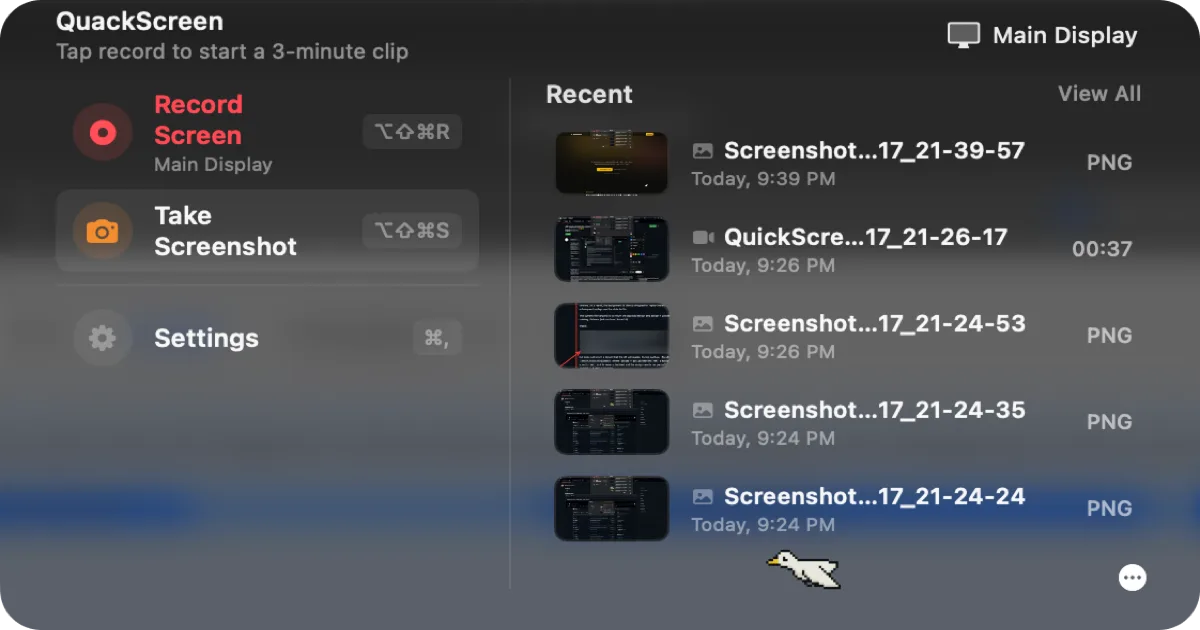
Recordings and screenshots land in the notch and drag straight into Slack, Mail, Finder, or any app.
Quick screen recording
Start a clip with a keyboard shortcut from the notch, no separate app window.
Instant screenshots
Capture any part of the screen and it appears in the same notch tray as recordings.
Recent clips tray
A scrollable list of recent screenshots and recordings for quick reuse.
The deal
- Free to download and use, with a watermark and recording length cap
- Lifetime license (one-time, €20 launch price) removes the watermark and length cap, covers 2 Macs
- Checkout via Stripe
QuackScreen — questions people ask
Is there a free version of QuackScreen?
Yes — you can download and use it for free; a license unlocks watermark-free exports and longer recordings.
What macOS version does QuackScreen need?
macOS 26 (Tahoe) or later, Apple silicon only.
How many Macs does a license cover?
One license covers two Macs, with all future updates included and no subscription.
Is QuackScreen free?
QuackScreen is free to use with optional paid unlocks.
Can I run QuackScreen together with another notch app?
No — QuackScreen draws at the notch, so it takes the place of any other notch app (hubs included). Apps that live in the menu bar or on screen stack alongside it fine.
Where can I download QuackScreen?
QuackScreen is available via Direct.
Reviews
No public ratings yet. Reader reviews are coming to Kitsmith soon.
Listing hand-verified July 27, 2026 from the developer's site and public sources.
How QuackScreen compares
Not sold on QuackScreen? These swap in
Notch apps run one at a time — pick one of these instead, not as well.

OBS Studio
FreeFree, open-source recording and live-streaming software — the standard the paid screen recorders in this list get compared against.

CleanShot X
$29 one-time (app + 1 year of updates + 1 GB cloud); Cloud Pro from $8/mo billed annuallyA screenshot and screen recording app with a built-in annotation tool, from the makers of PixelSnap — a one-time license, not a subscription for the base app.
Kap
FreeA free, open-source screen recorder that exports straight to GIF, MP4, WebM, or APNG from a simple menu bar dropdown.
Capto
7-day free trial, then paid (standalone price not listed on site); also included in Setapp from $14.99/moA screen recording and screenshot app with a built-in video and image editor, from Global Delight — also captures your connected iPhone or iPad’s screen.
Keep QuackScreen — stack these next to it
These live in the menu bar or on screen, so they run happily alongside any notch app.