Kitsmith / Screen Recorders
MacScreen Recorders
9 hand-verified screen recorders for Mac.
Screen recording on Mac splits along a familiar line: free, open-source tools built by a community project, and paid apps from a single company that fold recording into a broader capture workflow. Two of the five listings here cost nothing at all, and none of the paid ones charge a subscription just to record your screen.
OBS Studio and Kap are both free and open source, but built for opposite jobs. OBS, from the OBS Project community, is the deep end — scenes, sources, and mixers for combining windows, cameras, and audio, plus live streaming straight to Twitch and YouTube, not just local recording. It’s also the steepest learning curve in this section by a wide margin. Kap, from Wulkano, is the opposite: a one-click menu bar recorder built around a GIF-first workflow, exporting straight to GIF, MP4, WebM, or APNG with no separate conversion step.
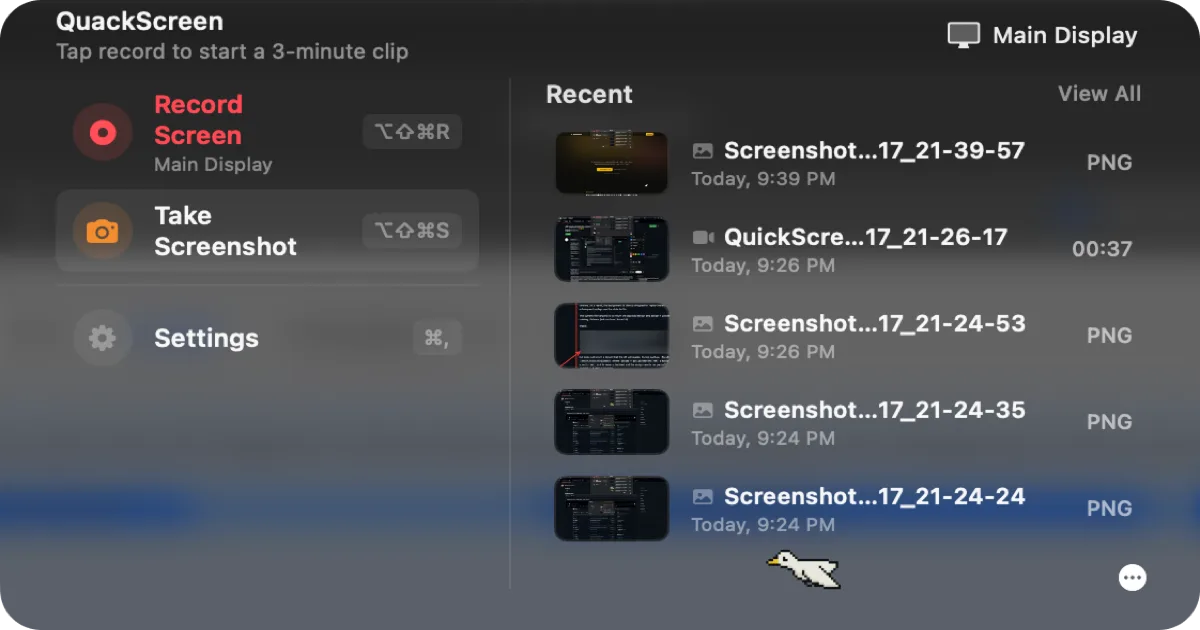
CleanShot X, from MTW (also makers of PixelSnap), is the most-referenced upgrade from macOS’s built-in screenshot tool — automatic desktop cleanup before a capture and built-in annotation, for a genuine $29 one-time license covering a year of updates; only the optional Cloud Pro tier ($8/user/mo billed annually) is a recurring cost. QuackScreen, from NFxAI, is the newest and the only one that’s actually notch-native — recordings and screenshots land in a notch tray you drag straight into another app — free to use with a watermark and length cap, or a €20 one-time lifetime license covering two Macs; it needs macOS 26 (Tahoe) on Apple silicon, so it won’t run on an Intel Mac. Capto, from Global Delight, has a feature none of the others do — recording a connected iPhone or iPad’s own screen from the Mac app — though its standalone price past the 7-day trial isn’t posted on the developer’s own site, so confirm it at checkout; it’s also bundled into Setapp from $14.99/mo.
All 9 apps
No apps match those filters.
QuackScreen
Free / €20 one-time lifetime licenseA native notch screen recorder and screenshot tool — record, drag the clip out, drop it into Slack or Finder.

OBS Studio
FreeFree, open-source recording and live-streaming software — the standard the paid screen recorders in this list get compared against.

CleanShot X
$29 one-time (app + 1 year of updates + 1 GB cloud); Cloud Pro from $8/mo billed annuallyA screenshot and screen recording app with a built-in annotation tool, from the makers of PixelSnap — a one-time license, not a subscription for the base app.
Kap
FreeA free, open-source screen recorder that exports straight to GIF, MP4, WebM, or APNG from a simple menu bar dropdown.
Capto
7-day free trial, then paid (standalone price not listed on site); also included in Setapp from $14.99/moA screen recording and screenshot app with a built-in video and image editor, from Global Delight — also captures your connected iPhone or iPad’s screen.
Gifox
$29.99 one-time, or included in Setapp from $14.99/moA menu bar screen recorder built around one output — shareable animated GIFs — with dedicated compression controls and direct sharing to Dropbox, Google Drive, and Imgur.
ScreenFloat
$17.99 one-time (Mac App Store or direct); also included in SetappA screenshot-and-recording tool built around “floating” shots that stay pinned above every window, with OCR text/barcode extraction and non-destructive markup.
Movavi Screen Recorder
From $5.41/mo on the 1-year plan ($64.95/yr, frequently discounted at checkout); $19.95/mo month-to-month. Free Mac App Store listing is a 7-day watermarked trial, not a free tierA subscription screen recorder from an established multimedia software company — webcam overlay, live drawing, and a recording scheduler, aimed at tutorials and webinars.
ScreenFlow
From $199 one-time (Standard); free, fully-functional trial available with no time limit, exports watermarked until purchaseTelestream’s screen recorder and video editor for Mac — simultaneous screen, camera, and mic capture plus a full timeline editor, from $199 one-time.
The verdict
We haven't singled out a top pick here yet — every one of the 9 is hand-verified, so start wherever your job description points you. 2 of the 9 are free, and 2 are open source. Paid options range $5.41–$199, one-time or subscription depending on the app.
Compare directly
Mac screen recorders — questions people ask
Is there a free screen recorder for Mac?
Yes — OBS Studio and Kap are both fully free and open source. QuackScreen is also free to use, with a watermark and recording-length cap removed by a €20 one-time lifetime license.
What’s the difference between OBS Studio and a simpler recorder like Kap?
OBS Studio is built for scenes, multiple sources, and live streaming to Twitch or YouTube, with the steepest learning curve here. Kap is a one-click menu bar recorder built around exporting straight to GIF, with no live-streaming feature.
Can I record my iPhone’s screen from a Mac app?
Yes — Capto can record a connected iPhone or iPad’s screen directly from its Mac app, a feature none of the other listings here offer.
Which of these actually uses the Mac notch?
QuackScreen (NFxAI) is the notch-native one — recordings and screenshots land in a tray at the notch you can drag straight into another app. It needs macOS 26 (Tahoe) or later on Apple silicon; the other four run as regular menu-bar or on-screen apps.